
How to Use Seamailer’s Built-in Email Templates for Faster Campaigns
If there’s one thing every email marketer, founder, and creator wants, it’s speed. Not rushed speed—but efficient speed. The kind that allows you to launch campaigns faster without sacrificing quality, personalization, or conversion potential.
And if you’ve spent years building email campaigns from scratch, you already know how much time is lost in drafting layouts, fixing formatting issues, adjusting spacing, rewriting copy, and making sure every CTA button is aligned.
That’s exactly why Seamailer’s built-in email templates exist: to help you ship campaigns in a fraction of the time while keeping them polished, mobile-responsive, and consistently on-brand.
This guide breaks down how to use these templates the right way—so you can work faster, stay organized, and send emails that actually convert.
Let’s get started.
Why Seamailer’s Email Templates Matter for Faster Campaigns
Speed in email marketing isn’t just about convenience. It’s about leverage.
Here’s what happens when templates do the heavy lifting for you:
1. You eliminate repetitive production work
Most teams spend hours every week creating the same types of emails—welcome series, newsletters, announcements, product launches, win-back campaigns. Templates remove the groundwork so you only focus on the copy and strategy.
2. You maintain consistent branding across every send
Brand inconsistency is one reason audiences lose trust. Seamailer templates give your emails a unified look, tone, and structural flow.
3. You reduce errors and formatting problems
Because templates follow set rules—padding, font choices, header size, mobile layout—your campaign is never an experiment. It works every time.
4. You get faster approvals and smoother collaboration
Marketers, founders, and teams review campaigns more quickly when they already know the structure. Everyone focuses on the message, not the design.
5. You scale your email marketing with ease
Whether you're sending one email per month or twenty per week, templates simplify everything.
This foundation is what makes Seamailer’s built-in templates more than a design convenience, they’re a strategic tool for growth.
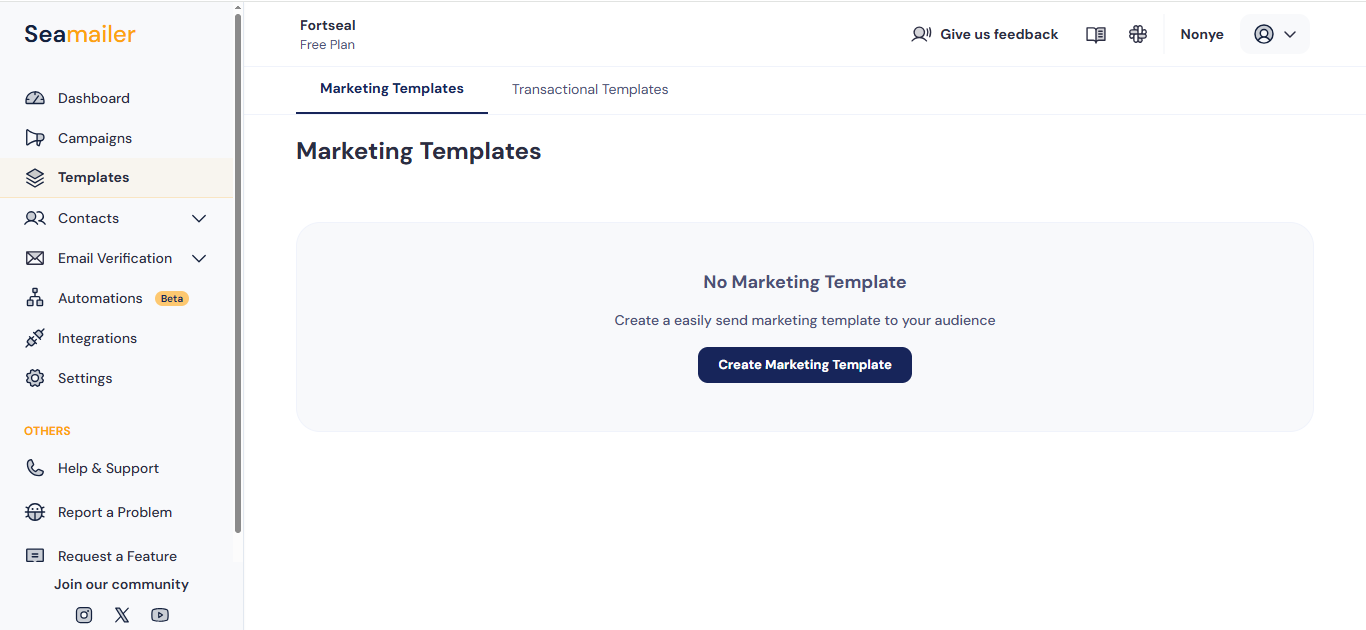
How to Access Seamailer’s Built-In Email Templates
Using the templates is simple, even if you’re new to Seamailer. Here’s a quick walkthrough.
Step 1: Log into your Seamailer dashboard
Once you enter your workspace, click on “Campaigns” in the navigation panel.
Step 2: Select “Create New Campaign”
This is where you choose between regular email broadcasts, automations, or sequences.
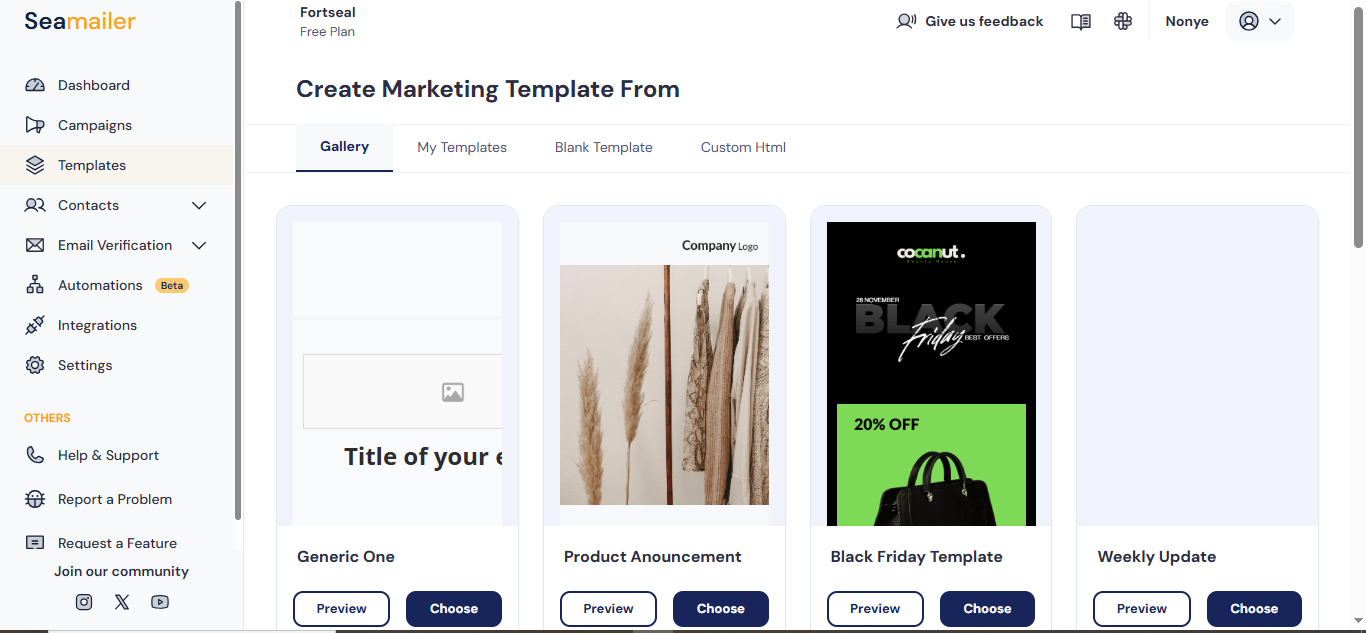
Step 3: Choose “Use a Template”
You will see a library of professionally designed templates tailored to various campaign goals.
Seamailer doesn’t overwhelm you with hundreds of random designs. Instead, the templates are categorized by:
- Welcome emails
- Newsletters
- Product announcements
- Sales campaigns
- Transactional emails
- Event reminders
- Lead nurturing sequences
- Re-engagement messages
- Seasonal promotions
Step 4: Preview a template
Click on any template to see how it appears on desktop and mobile. You’ll notice the layouts are clean, modern, and optimized for readability.
Step 5: Save your favorite templates
If you find a design you love, you can add it to your personal template library for reuse. This becomes powerful when you're sending recurring formats like weekly newsletters or monthly updates.
How to Customize Seamailer Templates for Your Brand
Templates give you the skeleton, but your brand brings them to life. Here’s how to customize them without extra hassle.
1. Add Your Brand Colors and Fonts
Seamailer allows you to set brand defaults so every new template automatically aligns with your identity. This includes:
- Primary and secondary colors
- Font choices
- Button styles
- Border styles
- Header and footer design
Once these are saved, they will apply across all templates, saving you hours of manual adjustments.
2. Replace the Placeholder Content
Swap out the template’s sample text with your actual copy. Seamailer’s editor lets you write directly inside each block.
Tips for writing faster:
- Use short paragraphs for readability.
- Write like you're speaking to one person.
- Be concise because your audience scans before they read.
- Put the value in the first two lines.
3. Swap or Remove Images Without Breaking the Layout
One of Seamailer’s strengths is its drag-and-drop visual editor. You can add or remove images without distorting the template.
Recommended image placements:
- Hero images for promotions
- Product photos for new launches
- Team headshots for personal newsletters
- Icons for visual appeal
- Logo for brand recognition
4. Edit Buttons and CTAs
Buttons can make or break a campaign. Seamailer gives you easy controls to change:
- Button text
- Button color
- Button shape
- Button size
- Link destination
Pro tip: Keep CTA text actionable and specific.
Examples:
- “Download Now”
- “Get Early Access”
- “See the New Collection”
- “Claim Your Bonus”
5. Add Dynamic Personalization
Personalization is one of the highest-converting email techniques. With Seamailer, you can insert:
- First name
- Last name
- Company name
- Location
- Custom fields
This elevates a template into an engaging, 1-to-1 message.
6. Adjust Sections Using Drag-and-Drop
You’re not stuck with the default order. You can:
- Move sections up or down
- Duplicate content blocks
- Delete blocks you don’t need
- Insert new text, images, videos, or spacers
This flexibility ensures your template fits your message and not the other way around.
The Best Templates for Different Email Campaign Goals
Seamailer doesn’t just give you random templates. They are built for conversion and categorized for real marketing needs. Here’s how to pick the right one.
1. For Newsletters: Choose “Long-Form Newsletter Template”
Best for creators, marketers, and founders who share content, updates, or insights every week or month.
Why it works:
- Balanced text-to-image ratio
- Scannable sections
- Clean typography
- Optional featured article block
2. For Welcome Emails: Choose “Welcome Onboard Template”
Best for onboarding new subscribers or customers.
Why it works:
- Strong hero header
- Space for brand introduction
- Built-in CTA for next steps
- Social links section
3. For Product Launches: Choose “Product Spotlight Template”
Best for announcing new products or features.
Why it works:
- Bold visuals
- High-impact headline space
- Multiple product blocks
- CTA placement built for conversions
4. For Sales Campaigns: Choose “Promo Boost Template”
Best for discount offers, limited-time deals, and seasonal promotions.
Why it works:
- Vibrant highlight blocks
- Countdown-friendly layout
- Clear offer positioning
- Multiple CTA opportunities
5. For Lead Nurturing: Choose “Educational Series Template”
Best for sequences that deliver value before asking for the sale.
Why it works:
- Modular content sections
- Easy segmentation messages
- Trust-building layout
6. For Event Reminders: Choose “Event Countdown Template”
Best for webinars, workshops, or live events.
Why it works:
- Clean time-based layout
- Highlight for date and time
- CTA for registration
- Personalization options
7. For Win-Back Campaigns: Choose “We Miss You Template”
Best for reactivating inactive subscribers.
Why it works:
- Friendly tone
- Space for incentives
- Memorable visual layout
Choosing the right template ensures your campaign already has a proven structure designed for results.
How to Build Faster Email Campaigns Using Saved Templates
Once you have customized templates to match your brand, you can save them as Custom Templates. This is where the real time-saving magic happens.
Here’s how teams use this feature to accelerate production:
1. Create a Template Library for Every Email Type
Store templates for:
- Weekly newsletters
- Product updates
- Automations
- Onboarding
- Customer education
- Transactional alerts
- Special offers
Now, your campaigns can be produced in minutes—not hours.
2. Reuse Templates for A/B Testing
Want to test two versions of the same email? Duplicate your template directly and test:
- Headline variations
- Button text
- Image placement
- Content length
This improves performance without rebuilding designs.
3. Standardize Campaigns Across Teams
If you're part of a team, custom templates act as brand guidelines. That means:
- Consistency across departments
- Faster approvals
- Reduced back-and-forth edits
4. Maintain a “Branded Master Template”
A master template includes:
- Header
- Footer
- Brand colors
- Fonts
- Default CTA styling
All future templates start from this foundation, giving you uniformity and speed.
Tips for Getting the Best Results Out of Seamailer Templates
Templates create speed, but using them smartly creates conversions. Here are proven techniques.
1. Always Test on Mobile Before Sending
Most emails are opened on mobile first. Seamailer’s preview tool helps you:
- Check spacing
- Test CTA visibility
- Ensure images scale properly
- Confirm text readability
2. Keep Your Copy Short and Clear
Templates are structured for clarity, so avoid long paragraphs or overly technical language.
3. Use High-Quality Visuals
Poor images weaken trust. Use clean headers, professional photos, and well-designed graphics.
4. Keep One Primary CTA
Too many calls to action confuse the reader. Let your email drive toward one outcome.
5. Personalize Wherever Possible
Even one personalized line increases conversions. Use dynamic fields naturally in your copy.
6. Update Your Master Template Quarterly
Refresh your brand visuals and CTA styling every few months to keep your emails modern.
Real-World Example: How a Small Business Founder Saves 5+ Hours per Week
Imagine a founder running a growing eCommerce brand. Every week, she needs to send:
- A product highlight
- A newsletter
- A customer update
- An upsell offer
Before Seamailer templates, it took her two hours per email writing, designing, formatting, editing spacing, fixing mobile layout.
Now?
She loads her saved templates, swaps the copy, updates images, checks links, and hits send and total time per campaign is about 15 minutes.
Multiply that by several emails per week and she saves over five hours weekly, without sacrificing quality. That’s the power of using templates correctly.
Why Seamailer Templates Beat Cubic Layout Editors in Other Platforms
Be honest, many email platforms overload you with confusing drag-and-drop blocks, rigid structures, or bloated features you don’t need.
Seamailer focuses on:
Simplicity
Templates are easy to customize without breaking or misaligning layout blocks.
Speed
You don’t spend hours fixing padding or spacing issues.
Clean design
Minimalist, modern, and built for readability.
Deliverability-friendly structure
Templates avoid heavy coding that triggers spam filters.
Creator-first usability
Writers and founders don’t need to be designers to produce beautiful emails.
This is why Seamailer continues to stand out for small businesses and marketers who want efficiency without sacrificing quality.
Conclusion: Faster Campaigns Start With Smart Templates
Speed doesn’t come from working harder, it comes from building smarter systems. Seamailer’s built-in templates eliminate repetitive work, streamline production, and help you create high-performing emails in minutes instead of hours.
When you combine:
- A good template library
- Personalization
- Clean copy
- On-brand visuals
- A consistent CTA
You get campaigns that feel polished, intentional, and professional—without the overwhelm.
If you want to move faster, stay consistent, and scale your email marketing with ease, Seamailer’s templates give you every advantage.