
The Complete Guide to Creating High-Converting Email Campaigns with Seamailer
Stop sending generic blasts. Learn the advanced, human-centric strategies for segmentation, automation, and personalization using Seamailer to transform your email list into a relentless revenue engine.
The modern inbox is a battlefield. It’s cluttered, competitive, and subscribers are more ruthless than ever about hitting the unsubscribe button.
If you are still sending mass, "one-size-fits-all" email blasts, you are losing money. The secret to a truly high-converting email campaign isn't a magical copy formula or a perfect design, it's hyper-relevance. It’s making every single subscriber feel like you wrote the email just for them.
This is where a powerful platform like Seamailer stops being just a sending tool and becomes your strategic partner. Seamailer is built to simplify the complexity of advanced email marketing, allowing you to focus on the human connection that drives conversions.
This is the complete, non-generic guide to using Seamailer’s most potent features to build campaigns that don't just get opened, but reliably convert.
Part 1: The Foundation of Conversion, Audience Strategy
A high-converting campaign starts long before you write the first subject line. It begins with a deep, data-driven understanding of who you’re talking to and what they’ve done recently.
1. Know Your Target Customer (The ‘Who’)
Before you open the Seamailer editor, define the single, measurable objective for your campaign.
| Campaign Type | Primary Goal | Typical Seamailer Trigger |
| Welcome/Onboarding | Establish trust and prompt first action (click, login, small purchase). | New Subscriber Sign-Up or New Account Creation. |
| Abandoned Cart | Recover lost sales and reduce friction to purchase. | User Adds Item to Cart but leaves site before purchase (e-commerce integration). |
| Lead Nurturing | Move a cold lead toward a sales-qualified action (demo request, consultation). | Lead Downloads High-Value Asset (e.g., e-book, white paper). |
| Win-Back | Reactivate inactive subscribers. | No Opens or Clicks in the last 60-90 days. |
The Expert Seamailer Tip: Your goal must be singular. If the goal is "Convert to a paid subscription," every email in the sequence, from the welcome message to the final call, must logically lead the user toward that specific subscription.
2. Segment Like a Surgeon (The Power of Hyper-Relevance)
Generic blasts scream "robot." Segmentation is the act of dividing your Seamailer list into smaller, targeted groups based on specific, high-intent criteria. Segmented and targeted emails are proven to generate a significant portion of all email revenue.
Seamailer Segmentation Criteria to Leverage:
- Behavioral Data:
- Which pages did they visit on your site?
- Did they click a pricing link but not buy?
- What free resources did they download?
- Engagement Level:
- High Engagers: Open rates above 50% in the last 30 days.
- Low Engagers: No opens in the last 60 days (perfect for a Win-Back campaign).
- Demographic/Firmographic Data (Especially B2B):
- Job title, industry, company size, or location.
- Purchase History (E-commerce):
- First-time buyer vs. frequent buyer.
- Specific product line interest (e.g., they bought product A, but not product B).
Action Step in Seamailer: Navigate to Audience > Segments. Use the conditional logic builder to create highly specific groups, such as: "Contact has Tag: 'Downloaded Ebook X' AND has NOT clicked Link: 'Pricing Page' in the last 7 days." This group is your ideal audience for a targeted nurture campaign.
Part 2: The Conversion Engine, Automation Workflows
Manual sending is time-consuming and prone to error. High-converting campaigns run on smart automation. Seamailer’s visual workflow builder turns your conversion strategy into a hands-off machine.
3. Map Your Customer Journey (The Blueprint)
Never start building an automation in Seamailer without a visual map. Grab a whiteboard or a flowchart tool and plot your steps.
Example: Lead Nurturing Workflow
- START (Trigger): User downloads “The Ultimate Guide to X.”
- ACTION: Send Email 1 (Instantly) - “Thanks! Here is your guide.”
- WAIT: 3 days.
- CONDITION/DECISION: Did the user click on the link to your product page in Email 1?
- IF YES: ACTION: Send Email 2A - “A quick demo video of our tool in action.” → End Sequence.
- IF NO: ACTION: Send Email 2B - “Hey, did you find the guide helpful? Here’s a related blog post.”
- WAIT: 4 days.
- ACTION: Send Email 3 - “Time for a Next Step: Get 10% off your first month.” → End Sequence.
This mapping ensures you don't send conflicting messages and that every step moves the user closer to your ultimate goal.
4. Build the Workflow in Seamailer
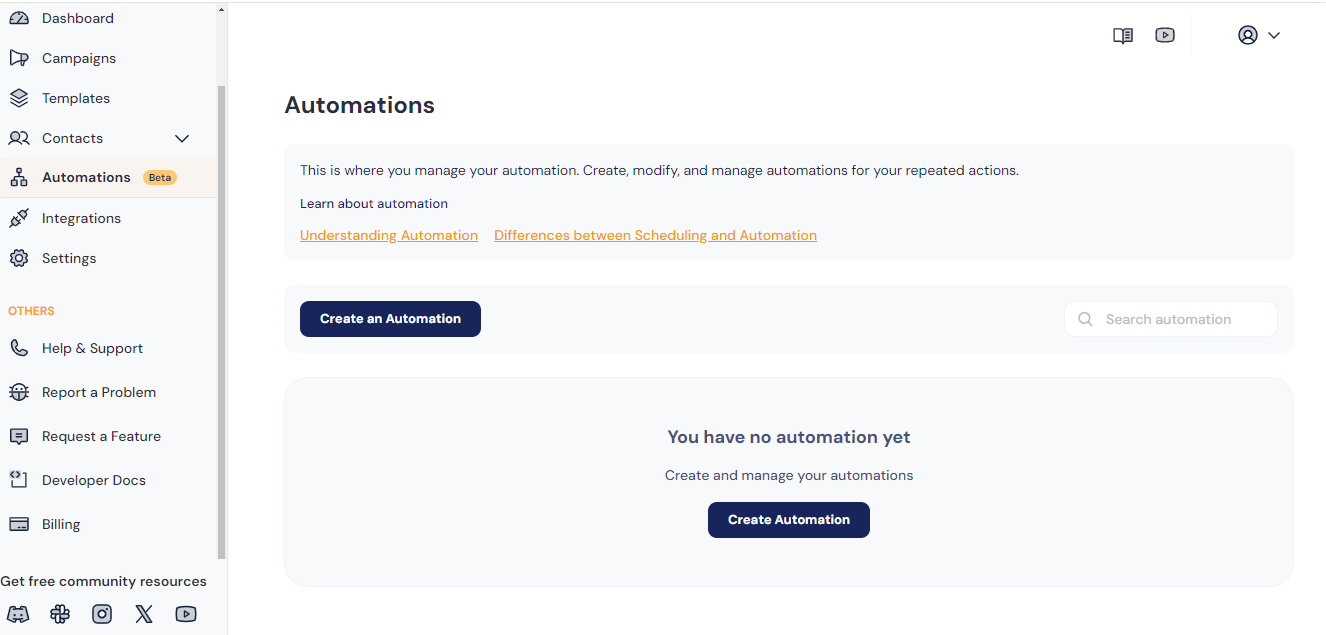
In the Automations section of Seamailer, you will use a simple drag-and-drop system:
- Set the Trigger: Select the starting action (e.g., “When a user is added to Segment: ‘Ebook Downloaders’”).
- Add Actions: Drag in “Send Email,” choosing one of your pre-designed, mobile-friendly templates.
- Set Delays: Use the “Wait” function to control the pace. Timing is crucial—you don't want to overwhelm a new lead.
- Implement Conditions: This is the conversion difference-maker. Use the “If/Then/Else” block to create the branching paths from your blueprint. This allows for true personalized experiences.
The Deliverability Secret: A high-quality Welcome Sequence establishes a good sender reputation from day one, dramatically improving the likelihood that your future marketing emails will land in the Primary Inbox, thanks to high initial open rates.
Part 3: The Art of the Click, Copy and Testing
Even the best automation is useless if the email copy is weak. High-converting copy is conversational, scannable, and respects the reader’s time.
5. Crafting Human-Sounding Email Content
The biggest mistake in automation is sounding like a robot. Write as if you are talking to one person over coffee.
- Use a Real Sender Name: "Jane from [Company]" beats "The Marketing Team" every time. It builds instant trust.
- Conversational Tone: Use contractions (it’s, you’re) and keep sentences short. Break up long paragraphs—people skim. Keep paragraphs to 2-3 lines max.
- Personalization Beyond Names: Go deeper than
{{First Name}}. Use dynamic content in Seamailer to reference the specific product they viewed, the city they’re in, or the specific lead magnet they downloaded.- Bad Personalization: "Hi John, Buy our software now!"
- Good Personalization (Behavioral): "Hi John, I saw you were checking out our guide on 'Advanced Facebook Ads.' You might find this free template for Facebook Ad Copy even more useful for your campaigns."
6. The Single, Irresistible Call-to-Action (CTA)
Every high-converting email has one job and one CTA. If you confuse, you lose.
- Make it Simple: Use an action verb that clearly tells the subscriber what to do.
- Avoid: Click Here, Read More.
- Use: Start Your 14-Day Trial, Get My 20% Discount, Watch the 60-Second Demo.
- Design and Placement: Your CTA button should be a high-contrast color and tap-friendly for mobile. Place it above the fold (visible without scrolling) and possibly repeat it once at the bottom.
7. A/B Testing: Your Conversion North Star
Never guess what works. Seamailer's A/B testing is your secret weapon for continuous conversion improvement. You can test subject lines, body copy, images, and send times.
The Golden Rule of Testing: Test one variable at a time.
| Variable to Test | Why You Test It |
| Subject Line | Measures your Open Rate. Are you creating enough curiosity/urgency? |
| CTA Copy | Measures your Click-Through Rate (CTR). Is the next step compelling? |
| Send Time/Day | Measures engagement. Is your audience reading their email now? |
| Email Format | Plain-text vs. rich HTML. Sometimes, a plain-text email with no images can feel more personal and drive a higher CTR. |
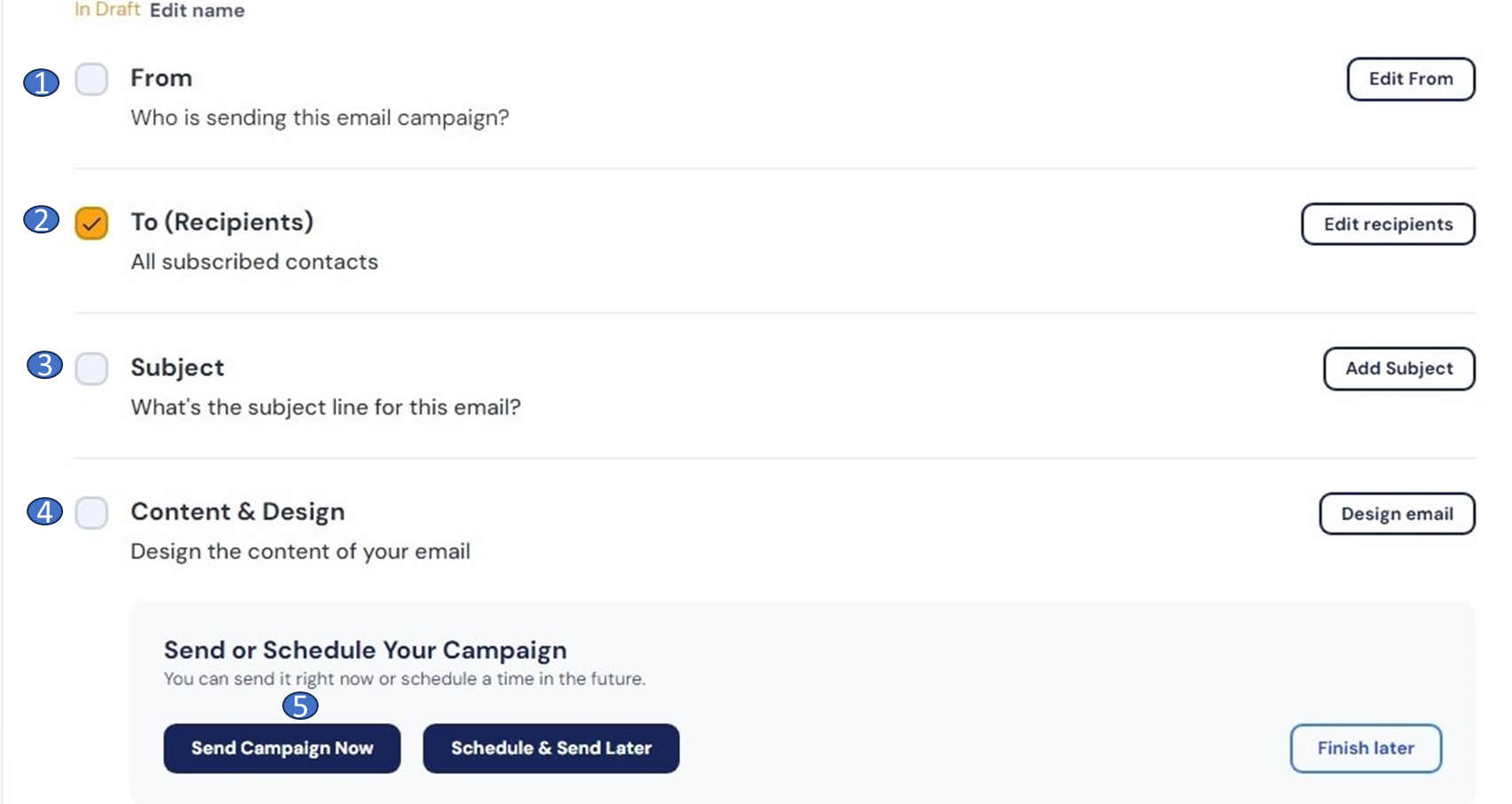
Action Step in Seamailer: When setting up a new campaign, select the A/B Test option. Seamailer will automatically split your audience into a test group (e.g., 10% A / 10% B). Once one version reaches a statistically significant conversion lead, Seamailer automatically sends the winning version to the remaining 80% of your list, guaranteeing you maximize the conversion of every single send.
Part 4: The Continuous Loop, Measure and Iterate
The work is never truly done. The best marketers continually monitor their sequences and make small, incremental changes that lead to massive conversion lifts over time.
8. The Only Metrics That Matter
Focus on these key metrics in your Seamailer Reporting Dashboard:
- Open Rate (OR): Is your subject line working?
- Click-Through Rate (CTR): Is your content relevant, and is your CTA compelling?
- Conversion Rate: Is the email achieving its singular goal (e.g., purchase, sign-up, download)?
- Revenue Per Email: The ultimate metric. Which segments and campaigns are generating the most profit?
Maintenance Checklist (Every 90 Days):
- Update Content: Is the content in your welcome sequence still your "best"? Are the links still valid?
- Tweak Timing: If the click through rate (CTR) for your abandoned cart email at 1 hour is low, try 45 minutes or 90 minutes. Small timing changes can yield huge results.
- Clean Your List: Aggressively remove unengaged subscribers (low engagement segment) to protect your sender reputation and boost all your key rates. A smaller, highly engaged list is always more valuable than a massive, cold one.
Conclusion: The Human Element Scales with Seamailer
Creating high-converting campaigns is not about being clever; it’s about being relevant. You don't need to write like a copywriter on Madison Avenue, but you do need to:
- Know who you are writing to.
- Give them one clear reason to click.
- Make it feel personal and real.
Seamailer gives you the segmentation, automation, and testing power to apply these human principles at scale. Start with your Welcome Sequence today, it’s the highest ROI email you will ever send, and build out your conversion engine from there.